
When a page is shared on Facebook, LinkedIn, WhatsApp or X, the post shows its image. Many pages have none, or show the logo stretched. Social images (a site’s Reports tab, PitwallWP Connect 0.35.0; the page’s photo and a look per post type need 0.39.0) gives each page a card with its own title, in the site’s colours, fonts and photos.
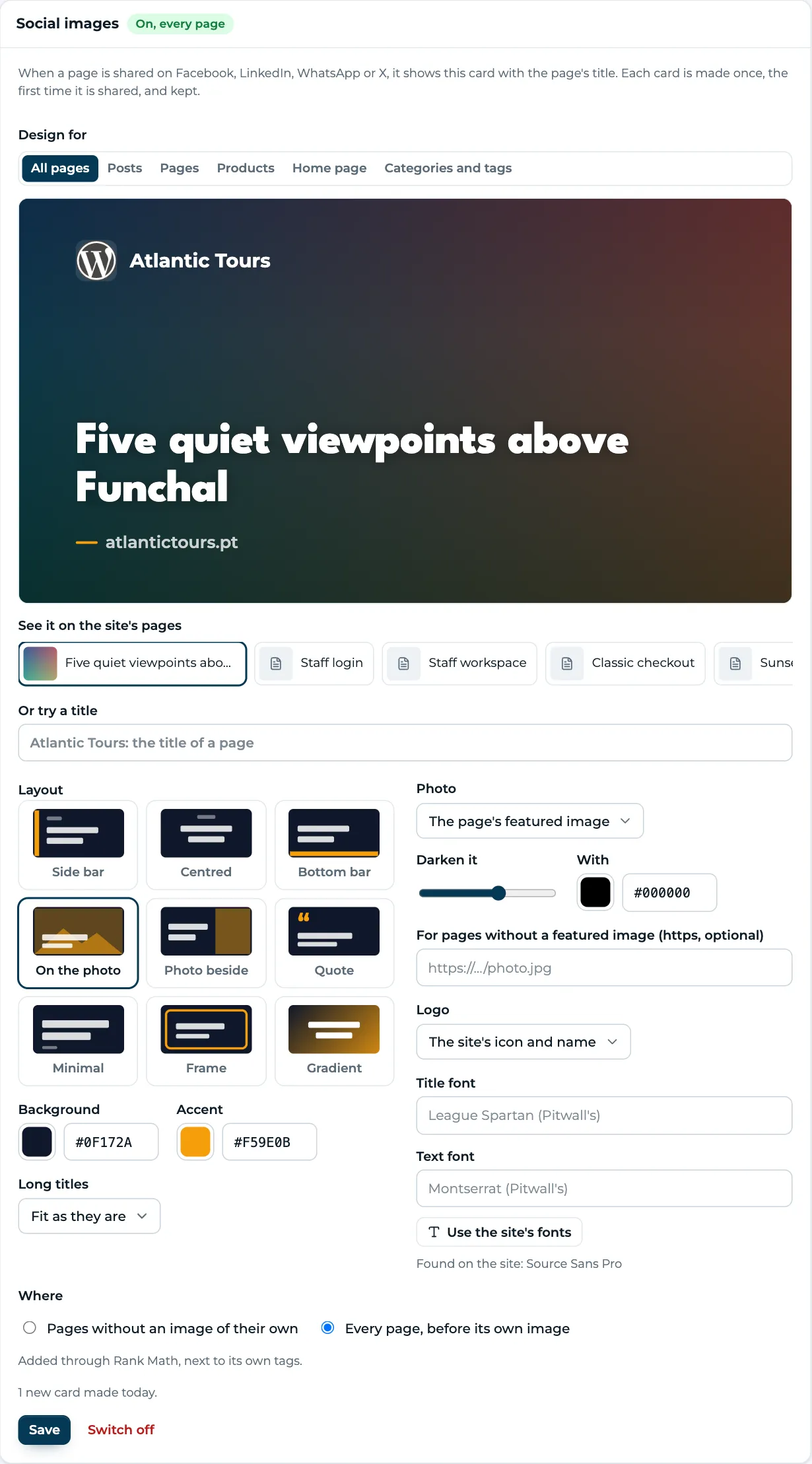
- Layout: nine to pick from. Side bar, centred and bottom bar; on the photo (the title over the page’s photo, darkened as much as you like, in the colour you choose) and photo beside; quote, minimal, frame and gradient. Then a background and an accent colour.
- Photo: none, the page’s own featured image, or the same photo on every card (an https address). With the featured image, pages without one use that address, if you give one.
- Logo: the site’s icon and name, the site’s logo (from its theme), a logo from an address, or just the name.
- Fonts: PitwallWP’s own, or Use the site’s fonts: PitwallWP reads the site’s home page and finds the fonts it uses, from Google Fonts or hosted on the site (icon fonts are left out). Any Google Font works too: type its name.
- Long titles fit as they are, or are cut at 60, 80 or 100 characters, on a word, with …
- Design for: the look is for all pages, or give posts, pages, products, the home page or categories a look of their own (a dot shows which have one). The others keep the look for all pages.
- The preview shows the site’s latest posts, pages and products with their real titles and photos; or type a title to see how a long one looks.
- Where: only on pages without an image of their own (a featured image, or one set in the SEO plugin), or on every page, placed before the page’s own image. To show the page’s featured image in the card, choose every page.
- With Rank Math or Yoast SEO, the card is added through their own image settings, so their tags stay the only ones. Without an SEO plugin, PitwallWP Connect adds the tags. Other SEO plugins print their own image with no way to add one, so the card says it will not show there.
- Each card is made once, the first time the page is shared, and kept; the home page’s is made as soon as you switch it on. A new look makes the cards again. At most 200 new cards a day per site.
Facebook and LinkedIn keep a shared image for a while: to see a change at once, ask them to read the page again (Facebook’s Sharing Debugger, LinkedIn’s Post Inspector). PitwallWP draws the cards with its own browser; with the OneSimpleAPI key (Integrations), OneSimpleAPI takes over when it cannot.