
Settings
Settings apply to every product unless a product overrides them. Five tabs.
Library: materials and colours
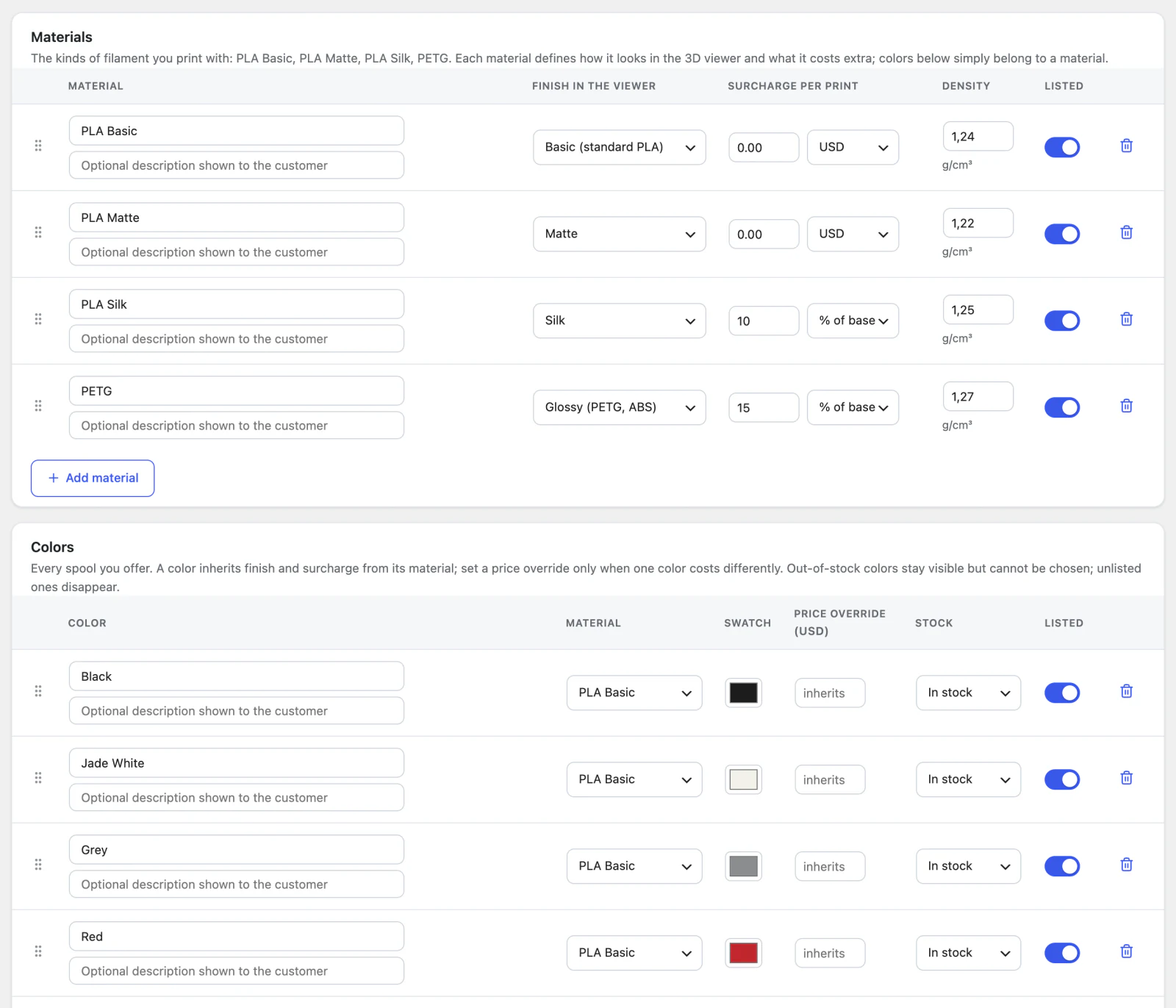
Materials are what filaments are made of: PLA Matte, PETG, and so on. Each has a finish (how it looks in the viewer: basic, matte, glossy, silk, metallic, translucent, sparkle, wood, carbon, or custom values), a surcharge per print, and a density in g/cm³ used to estimate weights when a product has no measured weight.
Colours are the filaments you stock: a name, its material, a swatch colour, an optional price override, and whether it is in stock. An out-of-stock colour stays visible on the product page but cannot be chosen. Drag rows to reorder; the storefront lists them in this order.
Storefront display
How the customizer looks on every product page:
- Accent colour: any CSS colour, or a variable from your theme such as
var(--wp--preset--color--primary). Empty follows FluentCart. - Swatch style: a chip with the colour name, or a dot with the name in a tooltip.
- Filament layout: grouped by material with a heading each, material buttons first and then that material's colours, or one flat list.
- Labels: the words for Filament colour, Size, Custom text, Text colour, Add to cart, "(optional)" and the required marker.
- Elements: colour names, material labels, price differences on options, dimensions in the viewer, the price breakdown, the current choice next to headings. Each can be switched off.
A product can override any of these on its own page.
Size and pricing defaults
- Scale slider limits and step for products that use the slider instead of size buttons.
- Price exponent: 3 means price grows with volume (200% costs 8×). Use 2 to 2.5 for a gentler curve, 1 for linear.
- Minimum price for any configured print.
- Packaging weight in grams, added to every item's weight for shipping. A product can set its own.
Printer
Your build volume, from a Bambu Lab preset or custom dimensions. Products are checked against it: the editor says how far a model can be scaled up before it stops fitting, and sizes that would not fit are not offered.
3D viewer
- Replace the product gallery: the viewer takes the gallery's place on the product page. Off, it sits above the options.
- Height: fill the column, a fixed aspect ratio, or a fixed height in pixels; the corner radius.
- Poster: the product's poster or featured image while the model loads, or nothing.
- Auto-rotate, zoom buttons, scroll to zoom (off by default so the page scrolls normally over the viewer), AR on phones.
- Lighting: the bundled studio environment, neutral, or your own HDR; exposure, shadow intensity, background.
- Printed look: subtle layer lines that make the model read as a print instead of a smooth render, with their strength and layer height.
Automation
- Print files: whether each job gets a ready-to-slice 3MF with the text built in, hidden parts left out and the size baked in. See Print queue.
- Outgoing webhook: a signed JSON POST on every status change you tick (paid, printing, done, cancelled), for n8n, Make, Home Assistant or a script on the print PC. See Automation and API.